
Every Amazon package you've received has a Code 128 barcode on the shipping label. So does the wristband they gave you at the hospital, the shelf tag at your local warehouse store, and the inventory sticker on the back of every laptop in a corporate office.
Most people think of barcodes as those striped things on product packaging at the supermarket. Those are EAN-13 or UPC-A — a completely different format with strict rules about who can use them and what they can encode. Code 128 is different: it's the workhorse of internal logistics, more flexible than EAN-13, encodable for any text or number, and completely free to use without registration.
This guide explains what Code 128 is, how its three sub-types differ, how it compares to other formats, and how to generate one in under a minute.
What is a Code 128 barcode?
Code 128 was developed in 1981 by Computer Identics Corporation and published as a standard in 1987. The name comes from its ability to encode all 128 characters of the ASCII character set — the same character set used by computers to represent text. That's what makes it so flexible compared to older formats like Code 39, which only supports 43 characters.
Unlike EAN-13 and UPC-A (the barcodes used at retail checkouts), Code 128 has no fixed length. It can encode a 3-character internal code or a 40-character alphanumeric serial number — the barcode just gets wider. There's no registration required, no organization to apply to, and no fee. You define what data goes in it, and you generate it.
This combination of flexibility and zero registration overhead is why Code 128 became the dominant format for logistics, supply chain, healthcare, and internal inventory systems. It's everywhere — you just never knew what to call it.
Code 128A, 128B, and 128C — which one do you need?
Code 128 has three character set modes, each designed for a different type of data. Most barcode generators handle this automatically, but it's worth understanding the difference — especially if your software asks you to choose.
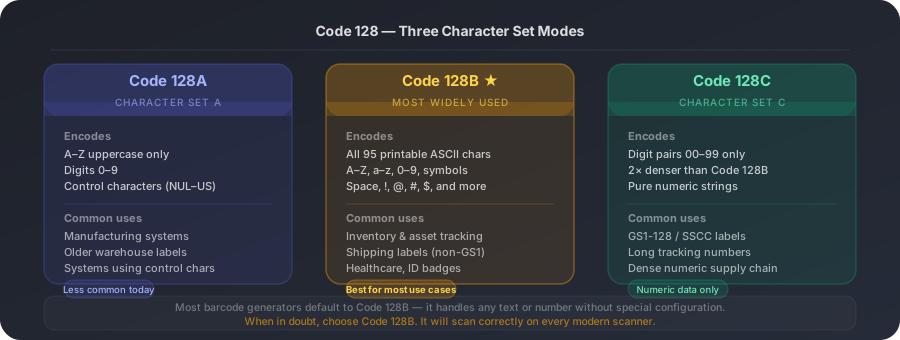
How Code 128 compares to other barcode formats
Code 128 is not the only barcode format — it's just the most capable general-purpose one. Here's how it stacks up against the formats you're most likely to encounter.
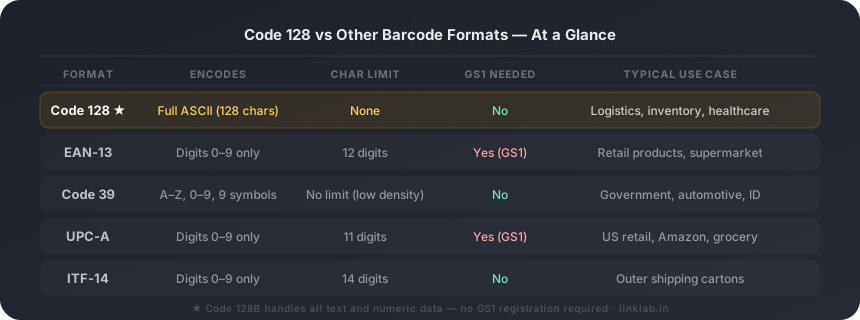
| Format | Encodes | Character limit | GS1 required | Typical use |
|---|---|---|---|---|
| Code 128 | Full ASCII (128 chars) | ✗No | ✗No | Logistics, inventory, healthcare |
| EAN-13 | Digits 0–9 only | 12 digits | ✓Yes | Retail products, supermarket |
| Code 39 | A–Z, 0–9, 9 symbols | No limit (low density) | ✗No | Government, automotive, ID cards |
| UPC-A | Digits 0–9 only | 11 digits | ✓Yes | US retail, Amazon, grocery |
| ITF-14 | Digits 0–9 only | 14 digits | ✗No | Outer shipping cartons |
Code 128 is the only common format with no character limit and no GS1 registration requirement.
When should you use Code 128?
Code 128 is the right choice whenever you need a barcode for internal use — not for products going to retail shelves (which require EAN-13 or UPC-A with GS1 registration). Specifically, it works well for:
How to generate a Code 128 barcode — step by step
- 1
Decide what data to encode
Write out the exact text string you want the barcode to contain. This could be a product SKU like "WH-2847-BLK", a serial number like "SN20260521-003", or any combination of letters, digits, and symbols up to whatever length your system uses. Code 128 has no character limit — keep the string as short as is practical to keep the barcode compact and reliable.
- 2
Open a free barcode generator
Go to a free barcode generator online. LinkLab's free barcode generator supports Code 128 alongside EAN-13, UPC-A, and ITF-14. No account is required for basic generation.
- 3
Select Code 128 as the format
From the format dropdown, choose "Code 128". If you see sub-type options (A, B, C), choose Code 128B unless your data is purely numeric and very long (in which case Code 128C is more compact). Most generators default to Code 128B automatically and handle the sub-type selection internally.
- 4
Enter your data and preview
Type or paste your data string into the input field. The barcode preview will update in real time. Check that the human-readable text below the barcode (if shown) matches your input exactly — this is the quickest way to spot a typo before generating the final file.
- 5
Download as SVG or PNG
Download SVG if the barcode will be printed — it's a vector format that stays sharp at any size, from a 1cm label to a full-page poster. Download PNG if you're embedding the barcode digitally (email, spreadsheet, web page). For physical labels, always use SVG.
Quiet zones and minimum bar width matter
1. Quiet zone — every Code 128 barcode needs a clear white margin (quiet zone) on both sides, at least 10 times the width of the narrowest bar. If you crop or place the barcode too close to other elements, scanners will fail to read it. Most label software handles this automatically, but check your final print layout. 2. Minimum size — the narrowest bar in a Code 128 barcode should be at least 0.19mm wide at print time. Below that, scanners struggle. At standard label sizes (50mm × 25mm or larger), you're well within this limit. For very small labels, test the scan before a print run.
Generate your Code 128 barcode free with LinkLab
Generate a Code 128 barcode — free, no sign-up
Enter any text or number, pick your format, and download PNG or SVG in seconds. Works for inventory labels, asset tags, and shipping barcodes.