
You have a link. You want a QR code. The actual conversion should take less than a minute.
QR codes have become one of the most practical ways to share a web address offline — on a business card, a product label, a printed flyer, a restaurant table card, even a billboard. And the process of turning a URL into a scannable code is genuinely simple when you use the right tool.
But there are a few things worth knowing before you generate and print. The file format you download matters for print quality. The length of your URL affects how dense — and how reliable — the code is to scan. And if you ever want to know how many people actually scan your code, you need to set that up before generating, not after.
This guide covers all of it, in the order you actually need it.
What "converting a link to a QR code" actually means
A QR code is just a visual encoding of data. In this case, the data is your URL. When someone points their phone camera at the code, the device reads the pattern and opens the link automatically — no typing required.
The process of "converting a link to a QR code" is really just encoding your URL into a QR pattern and downloading an image file of that pattern. The image is what you print, share, or embed. The QR code doesn't store the website itself — it stores the address, and the browser does the rest.
This is important to understand because it explains two things: why the length of your URL affects the QR code's complexity, and why changing the URL after printing requires a new code (unless you use a dynamic QR code, which we cover below).
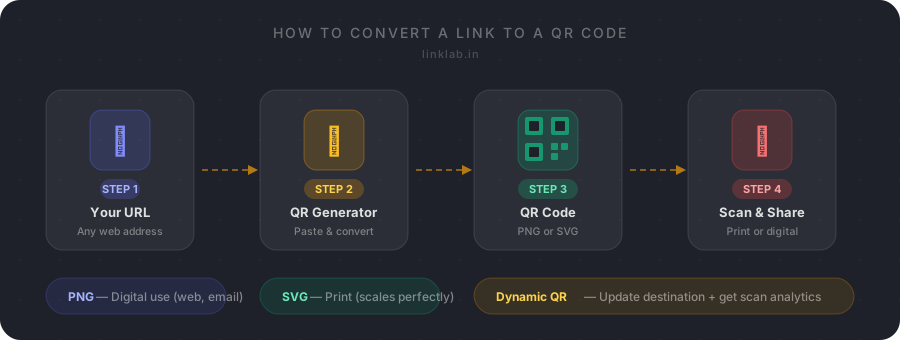
How to convert a link to a QR code — step by step
- 1
Copy your full URL
Start with the complete web address you want people to reach. This can be a homepage, a product page, a Google Form, a PDF link, or any web address starting with https://. Before anything else, open the link in a browser and confirm it works. A QR code that points to a broken link is useless — and if you've already printed it, it's an expensive mistake.
- 2
Open a free QR code generator
Go to a free online QR code generator — LinkLab's works directly in your browser, no account required for basic generation. You don't need to install anything or create an account to convert a standard URL into a QR code.
- 3
Paste your link and preview the code
Paste the full URL into the input field. Most generators update the preview in real time as you type. What you see in the preview is exactly what you'll download — the pattern, the size, the colours.
- 4
Customise if needed (optional)
Basic QR codes are black and white, which works fine for almost every use case. If you want to match your brand, you can adjust foreground and background colour, size, and quiet zone (the white border). Some generators let you embed a logo. Keep in mind that heavy customisation can reduce scan reliability if contrast is too low or the logo covers too much of the pattern. Test on a real phone before distributing.
- 5
Download PNG or SVG
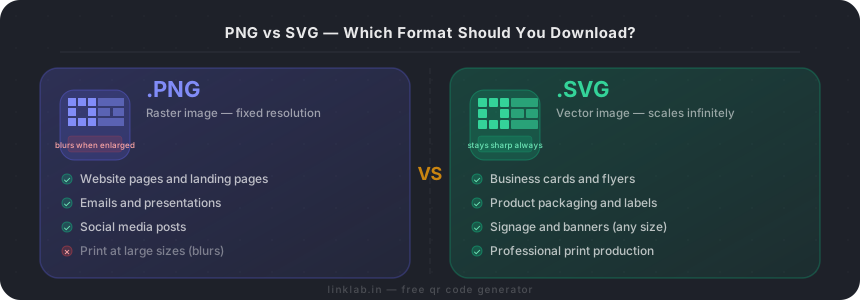
Choose PNG if you're using the QR code digitally — on a website, in an email, or in a presentation. Choose SVG for anything that will be printed. SVG is a vector format that stays sharp at any size, from a business card to a billboard. PNG at small sizes looks fine on screen but can blur when enlarged for print.
PNG or SVG — which format should you download?
This is the most common question people get wrong, so it's worth a clear answer.
Download SVG if the QR code is going anywhere it will be printed. SVG is a vector format — it scales to any size without losing sharpness. Whether you print it on a business card at 2.5 cm or a retail banner at 100 cm, the code stays perfectly crisp. This is the format graphic designers, printers, and packaging studios work with.
Download PNG if you're using the QR code digitally — on a website, in an email signature, in a slide deck, or posted to social media. PNG is a fixed-resolution raster image. It looks fine on screen at the right size, but it can look blurry if you enlarge it significantly for print.
The practical rule: if you're unsure, download SVG. It works everywhere PNG works, and it handles print without any quality loss.
Should you shorten the URL before creating the QR code?
You don't have to, but it's often worth doing — especially if your URL is long or has tracking parameters attached.
Here's why: the QR code encodes every character of your URL as part of the pattern. A longer URL means more data, which translates to a denser grid of black and white modules. Dense patterns are harder to scan reliably, particularly at small sizes or in poor lighting.
Shortening the URL before generating the code creates a simpler pattern that scans more reliably at smaller print sizes. But there's a second benefit that matters more for most business use cases: link tracking.
When you use a short link for your QR code, every scan is recorded as a click in your analytics dashboard. You can see total scans, unique scans, device type, country, and time patterns. None of that is possible if your QR code points directly to a long URL with no redirect in the middle.
For any QR code you plan to print at scale — on packaging, flyers, event materials — using a short link from LinkLab before generating the QR code is the better setup. It takes 30 extra seconds and gives you a completely measurable campaign.
Quick tip: short links make better QR codes
A URL like linklab.in/abc123 creates a QR code with far fewer modules than https://yourdomain.com/products/category/item?utm_source=flyer&utm_medium=print. The simpler the URL, the simpler and more reliable the QR code — and a short link gives you scan analytics for free.
Convert your link to a QR code free
No sign-up needed for basic generation. Download PNG or SVG instantly.
Static vs dynamic QR codes — which should you use?
A standard QR code (also called a static code) encodes the destination URL directly into the pattern. Once printed, the destination is fixed. If your URL ever changes — your domain moves, you update a landing page, your promotional offer expires — you need to reprint everything carrying that code.
A dynamic QR code encodes a short redirect URL instead. The visual pattern stays the same, but you can update the destination anytime through your QR platform. The person scanning still reaches the right page instantly — the redirect happens in a fraction of a second.
Dynamic QR codes also collect scan analytics automatically. Every scan is logged with device type, location, and timestamp before the redirect completes.
The decision is straightforward: if you're printing QR codes on materials with any kind of lifespan — packaging, signage, business cards, branded merchandise — use a dynamic code. The small cost of a subscription is almost always less than the cost of reprinting when something changes.
Static codes are fine for truly one-time use: a QR code on an event handout pointing to a schedule that won't change, or a personal business card where the vCard contact data is permanent.
| Static QR Code | Dynamic QR Code | |
|---|---|---|
| Destination URL | Fixed at creation | Can be updated anytime |
| Pattern changes needed | Yes, if URL changes | No — pattern stays the same |
| Scan analytics | ✗No | Scans, device, location, time |
| Pattern density | Dense (full URL encoded) | Simple (short URL only) |
| Best for | One-time, permanent use | Print campaigns, packaging, signage |
| Cost | Free | Requires platform subscription |
For anything with a lifespan longer than the campaign, dynamic is almost always the right choice.
Where to use your QR code
Once you have the image file, you can use it almost anywhere a printed or digital image can appear.
QR codes on screens are harder to scan than QR codes on print
Glossy screens, brightness variations, and viewing angle all affect scan reliability. For digital surfaces — websites, apps, slide decks — a clickable link usually works better. Save QR codes for contexts where clicking isn't an option: printed materials and physical objects.
Common mistakes to avoid before you print
Most QR code problems are completely preventable. Here are the ones that come up most often — and each of them is easy to avoid.