
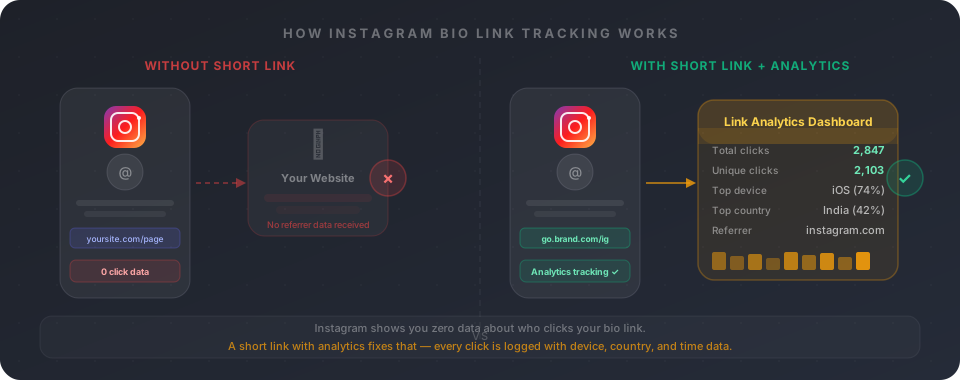
You can see reach, impressions, profile visits, and story views inside Instagram Insights. But click the "website" field in your bio? Nothing. Instagram tells you that people visited your profile. It doesn't tell you how many of them actually clicked through.
This is one of the most frustrating data gaps in social media marketing. Your bio link is often the only clickable link you have on Instagram. It's the bridge between your audience and your product, your content, your email list — whatever you're driving people toward. And yet you have no idea how many people are crossing it.
The fix is a short URL with UTM parameters — a link that looks clean in your bio but quietly logs every single click behind the scenes. Here's exactly how to set it up.
Why Instagram hides your bio link data
Instagram doesn't share referrer data the way other platforms do. When someone clicks your bio link and lands on your website, their browser typically strips or blocks the referrer header — the signal that tells your website "this visit came from instagram.com." As a result, your Google Analytics or any other tool just labels the visit as Direct traffic, which is basically a black hole.
Instagram also doesn't expose link click data in its native Insights dashboard. You can see how many people tapped your profile link in the context of a story or reel, but the bio link itself? It's invisible to the platform's own analytics.
This isn't an accident. Instagram wants people to stay on Instagram. Sharing detailed outbound click data would make it easier for creators and brands to measure exactly how much value they're getting from the platform — which is a complicated conversation for Meta.
The workaround is simple: you intercept the click before it lands on your site, using a short URL that logs the event the moment someone taps it.
What you actually need: a UTM-tagged short link
The setup has two parts — UTM parameters and a short link. They do different jobs, and you need both.
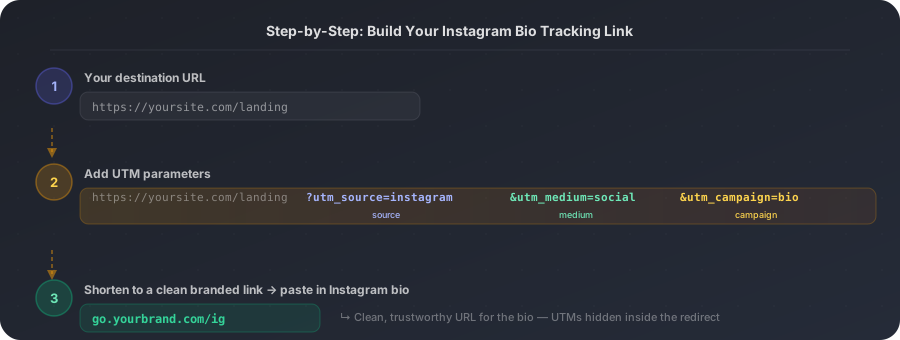
UTM parameters are tags you add to your URL so that Google Analytics (or whatever tool you use) knows where the traffic came from. They look like this: `?utm_source=instagram&utm_medium=social&utm_campaign=bio`. When someone arrives at your site with those tags in the URL, your analytics tool reads them and attributes the session correctly instead of dumping it into Direct.
A short link solves a separate problem. If you paste a raw URL with UTM parameters into your Instagram bio, it looks terrible — a wall of text that users immediately distrust. A short link wraps the whole thing in a clean, brandable address like `go.yoursite.com/ig`. When someone taps it, they're redirected to your full UTM-tagged destination, and your short link platform logs the click independently of your website analytics.
That means you get data from two sources: your short link dashboard (clicks, devices, countries) and your website analytics (sessions with UTM attribution). It's belt-and-braces tracking.
How to set it up — step by step
- 1
Start with your destination URL
Write down the exact page you want people to land on when they click your bio link. This should be a specific landing page, product page, or homepage — not a redirect. Example: https://yoursite.com/shop or https://yoursite.com/newsletter.
- 2
Build the UTM-tagged version
Add three UTM parameters to the end of your URL. Use utm_source=instagram, utm_medium=social, and utm_campaign= followed by a label that describes your current goal (e.g. bio, spring-promo, launch). Your full tagged URL might look like: https://yoursite.com/shop?utm_source=instagram&utm_medium=social&utm_campaign=bio. You can use LinkLab's UTM builder or Google's Campaign URL Builder — both generate the string automatically from a form.
- 3
Shorten it into a clean branded link
Paste the full UTM URL into a link shortener. In LinkLab, you can paste the URL, add a custom alias (like /ig or /instagram-bio), and optionally connect your own domain. You'll end up with something like lnk.bio/ig or go.yourbrand.com/ig — a clean link that hides all the UTM parameters but preserves them in the redirect.
- 4
Paste the short link into your Instagram bio
Go to Edit Profile on Instagram and replace whatever is in your website field with the new short link. That's it. Every tap from that point forward is logged in your short link analytics, and every visit that reaches your site will carry UTM attribution.
- 5
Verify it's working
Click the link yourself (ideally from a different device or in incognito). Check your short link dashboard — you should see a click appear within seconds. Then check GA4 or your analytics tool: go to Reports > Acquisition > Traffic Acquisition and look for a session with source/medium = instagram / social. If both show up, you're tracking correctly.
What you'll see in your analytics
Once you've set up the link and verified it works, here's the data you can expect to see in different places.
| Data point | Short link dashboard | GA4 / Analytics |
|---|---|---|
| Total clicks | ✓ — all clicks logged | ✓ — sessions with utm_source=instagram |
| Unique clicks | ✓ — deduped by device/IP | ✓ — unique users |
| Device type | ✓ — iOS vs Android vs desktop | ✓ — via device category |
| Country / city | ✓ — geolocated per click | ✓ — via geographic report |
| Referrer source | ✓ — instagram.com shown | Needs UTM (otherwise Direct) |
| Click time / trend | ✓ — hourly / daily chart | ✓ — in date comparison |
| Conversion goal | ✗ — short link only tracks clicks | ✓ — if goal events are set up |
Short link analytics and GA4 complement each other — clicks vs. on-site behaviour.
Three things that silently kill your data
1. Pasting the raw UTM URL directly (without shortening it) — it works technically but looks untrustworthy and some Instagram UIs truncate it. Always shorten. 2. Using the same campaign value for every link (e.g. always utm_campaign=bio) — if you run multiple Instagram promos, label them differently so you can separate the data. 3. Not verifying before publishing — test the link yourself before swapping it into the bio. A typo in the UTM string just routes people to your site with no attribution, silently.
What if you have multiple links in your bio?
If you're using a link-in-bio tool like Linktree, Beacons, or a similar multi-link page, the same principles apply — but at a different level. The link you put in your bio should be to your multi-link page, and each individual link on that page should be UTM-tagged separately.
For example, if your link-in-bio page has three links — your shop, your latest blog post, and a free download — each one should have its own utm_campaign value: utm_campaign=shop, utm_campaign=blog-may, utm_campaign=free-guide. That way you can see in GA4 which specific link drove the visit, not just that it came from Instagram.
If your link-in-bio page is hosted on a third-party platform, you might not be able to customise the UTM parameters. In that case, use a smart short link that redirects to a UTM-tagged version of your multi-link page — this at least captures the top-level attribution.
Alternatively, consider replacing the multi-link page entirely with a single, well-chosen landing page. A focused destination often converts better than a menu of options, and it makes your tracking much simpler.
Track your Instagram bio link with LinkLab
Set up your Instagram tracking link — free
Build a UTM-tagged short link for your Instagram bio in under a minute. Every click logged, no GA4 required.