
Walk into any supermarket, scan any product at checkout, and you're reading an EAN-13 barcode. It's been the global standard for retail product identification since 1976. Amazon uses it. Walmart uses it. Every major retailer across Europe, Asia, and increasingly North America uses it.
If you're selling products — online or offline — you need to understand EAN-13. Not because generating the barcode is complicated (it isn't), but because the number inside has specific meaning and structure. Using a random 13-digit number that isn't assigned to your company can cause scanner failures, Amazon listing rejections, and retailer compliance problems.
This guide explains how EAN-13 works, what each of the 13 digits means, how it relates to UPC-A, when you need GS1 registration, and how to generate one for free.
What is EAN-13?
EAN stands for European Article Number — though the format is now used globally and the "European" label is largely historical. EAN-13 was developed in 1976 by a European consortium as a way to standardize product identification across retail chains, replacing a patchwork of country-specific systems.
The "13" simply means 13 digits. Each barcode encodes a number that globally and uniquely identifies a specific product in a specific variation — a 250ml bottle of olive oil and a 500ml bottle of the same brand get different EAN-13 numbers, even if everything else about them is the same.
EAN-13 is managed today by GS1, a global nonprofit that licenses company prefixes, maintains the numbering system, and ensures that no two companies share the same product identification range. If you've bought anything at a supermarket, pharmacy, or electronics store, you've read thousands of EAN-13 barcodes without knowing the name.
What each of the 13 digits means
The 13 digits aren't random — they follow a precise structure that tells every scanner, retailer, and inventory system exactly who made the product and which product it is.
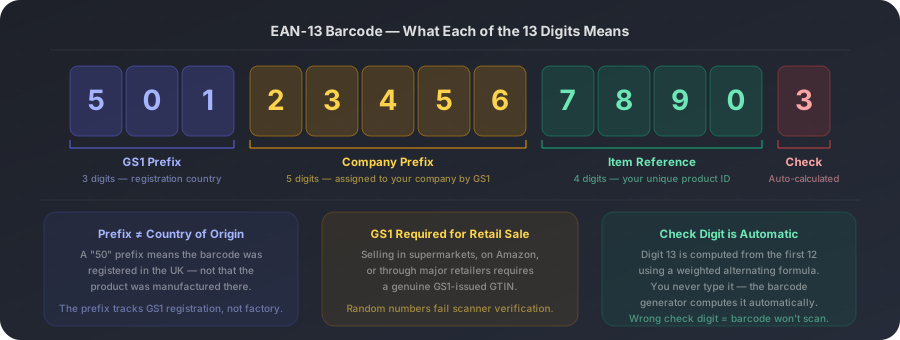
EAN-13 vs UPC-A: what's the actual difference?
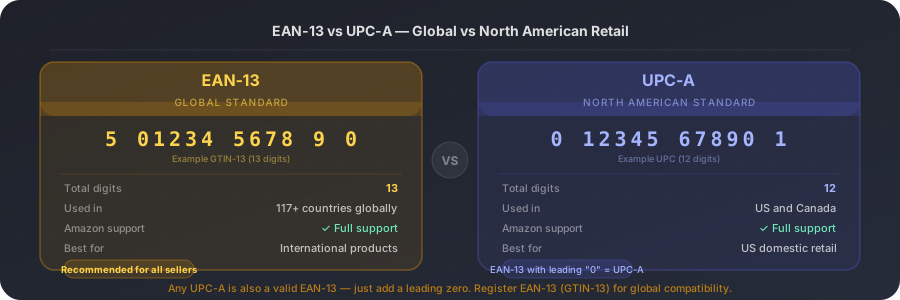
If you've sold on Amazon in the US, you've probably seen both EAN and UPC mentioned. The relationship is simple: UPC-A is an older 12-digit format developed in the United States in the 1970s, while EAN-13 is the internationally extended version developed shortly after.
The practical connection: any UPC-A barcode is automatically a valid EAN-13 — just add a leading zero in front of the 12 UPC digits to get the 13-digit EAN. That's why modern scanners everywhere (including Amazon) accept both formats without issue.
It depends entirely on where the barcode will be scanned
FOR RETAIL SALE (supermarkets, Amazon, major retailers): Yes. You need a genuine GS1 Company Prefix and a GTIN (Global Trade Item Number) issued by GS1. Retailers verify GTINs against the GS1 database. A random number will fail verification and get your listing rejected or your product refused. Register at gs1.org — a US company prefix starts at $250/year. FOR INTERNAL USE ONLY (your own warehouse, inventory tracking, in-house systems): No. You can generate any 13-digit number without GS1 registration. The barcode will work perfectly in your internal systems — it just can't be verified in the global GS1 database.
How to generate an EAN-13 barcode — step by step
- 1
Have your 12-digit product number ready
For retail sale: use the 12-digit GTIN assigned to your product by GS1 (your Company Prefix + your Item Reference). The barcode generator will calculate the check digit (digit 13) automatically. For internal use: you can use any 12-digit number — the generator will compute the 13th digit.
- 2
Open a free barcode generator
Go to a free online barcode generator that supports EAN-13. LinkLab's free barcode generator supports EAN-13 alongside Code 128, UPC-A, and ITF-14 — no account needed for basic generation.
- 3
Select EAN-13 as the format
From the barcode format dropdown, choose EAN-13. Enter your 12-digit number (not 13 — the generator adds the check digit automatically). The preview will show the full 13-digit barcode with the human-readable number below it.
- 4
Check the preview carefully
Confirm the 12 digits you entered appear correctly in the human-readable text below the barcode. Even one transposed digit will produce a completely different barcode that may scan to the wrong product — or fail the GS1 database lookup entirely.
- 5
Download SVG for print, PNG for digital
Download SVG if the barcode is going on product packaging, labels, or any printed surface. SVG is a vector format that stays sharp at any size — essential for labels where the barcode needs to scan reliably. Download PNG for digital applications (spreadsheets, inventory management software screenshots, online listings).
Two checks before sending to print
1. Scan test — before printing a full batch, test the barcode image on a phone camera (or a barcode scanner app). The scanned number must match the number you entered. If it doesn't, your barcode generator made an error. 2. Minimum size — the standard minimum size for an EAN-13 barcode is 37.29mm × 26.26mm (at 100% magnification). At minimum magnification of 80%, that's roughly 29.8mm × 21mm. Below this, some scanners will struggle at point of sale. Most product labels are well above this threshold, but verify before printing small-format labels.
Generate your EAN-13 barcode free with LinkLab
Generate an EAN-13 barcode — free, instant download
Enter your 12-digit product number, select EAN-13, and download PNG or SVG in seconds. Works for product packaging, inventory labels, and Amazon listings.