
Your retail product has an EAN-13 barcode on the label. But the moment you pack 12 of them into a cardboard shipping carton, that carton needs its own barcode — and that's exactly what ITF-14 is for.
ITF-14 (Interleaved 2 of 5, 14 digits) is the international standard for barcoding outer packaging. It tells warehouse scanners, 3PLs, and retail distribution centers exactly what's inside the box and how many units it contains — without opening it.
This guide explains how ITF-14 works, how its 14 digits are structured, when you need one (and when you don't), and how to generate a valid ITF-14 barcode free using LinkLab.
What is an ITF-14 barcode?
ITF-14 stands for Interleaved 2 of 5 with 14 digits. It's a linear (1D) barcode format specifically designed for marking outer packaging — shipping cases, corrugated cartons, and pallet-level containers in supply chains.
Unlike EAN-13 (which encodes a single retail product), ITF-14 encodes a GTIN-14: a 14-digit number that identifies a grouping of products at a specific packaging level. A case of 12 water bottles, a pallet of 48 cereal boxes — each gets its own GTIN-14 and its own ITF-14 barcode.
The Interleaved 2 of 5 symbology is popular for outer packaging because it's rugged. Wide bars and spaces make it readable on rough, slightly distorted corrugated cardboard surfaces that would trip up a more delicate format like EAN-13.
You'll find ITF-14 barcodes on virtually every product carton sitting in supermarket warehouses, Amazon FBA receiving docks, and 3PL distribution centres worldwide.
ITF-14 barcode structure: what each of the 14 digits means
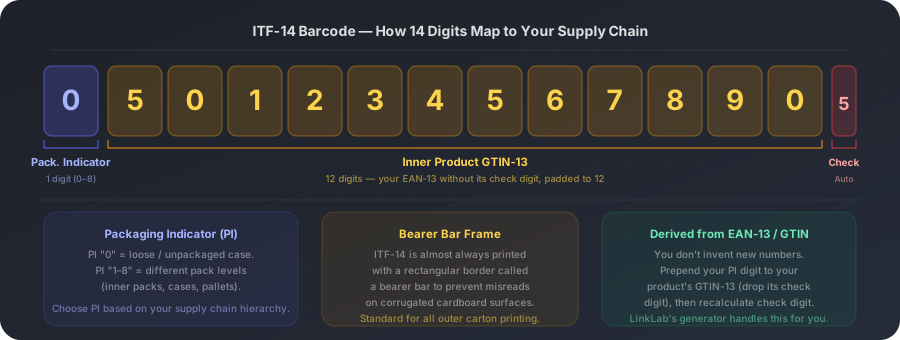
An ITF-14 barcode encodes exactly 14 digits. The structure is straightforward once you understand where the number comes from.
Digit 1 is the Packaging Indicator (PI). This single digit (0 through 8) tells the supply chain what packaging level the barcode represents. "0" is typically used for a loose or non-standard grouping. "1" might be an inner pack of 6, "2" a master case of 12, and so on — the exact meaning is agreed on between you and your trading partners. Most small businesses simply use "0" or "1".
Digits 2–13 are your product's GTIN-13 without the check digit. You take your EAN-13 barcode number, strip its last digit (the check digit), and use the first 12 digits here.
Digit 14 is a new check digit, calculated fresh from all 13 preceding digits. Your barcode generator handles this automatically.
The whole thing looks like: [PI][12 digits from your GTIN-13][new check digit]. A typical ITF-14 might be 05012345678905.
The bearer bar: why ITF-14 has a frame
If you've ever seen an ITF-14 barcode, you may have noticed something EAN-13 and Code 128 don't have: a solid rectangular frame around the entire barcode. That frame is called a bearer bar.
The bearer bar solves a real problem. Corrugated cardboard is not a flat, uniform surface. It warps, gets damp, and develops texture variations that can cause a scanner's edge-detection algorithm to misread the quiet zone (the blank space at either end of the barcode) as a valid bar. When that happens, the scan fails.
The bearer bar acts as a hard boundary. By drawing a solid line along the top and bottom of the barcode, it removes any ambiguity about where the symbol starts and ends — preventing partial scans and misreads on rough surfaces.
GS1 specifies that ITF-14 barcodes intended for corrugated packaging should always include bearer bars. LinkLab's ITF-14 generator includes the bearer bar by default. Don't remove it.
How to generate an ITF-14 barcode free
Generating an ITF-14 barcode takes less than two minutes if you already have your product's GTIN-13.
- 1
Find your product's GTIN-13
This is your EAN-13 barcode number — the 13-digit number printed below your product's retail barcode. You need a GS1-registered GTIN. If you don't have one yet, register at gs1.org.
- 2
Choose your Packaging Indicator digit
Decide which packaging level this carton represents and assign it a PI digit (0–8). Most small businesses use "0" for a loose or mixed case, or "1" for a standard inner pack. Agree on the convention with your retail buyer or 3PL.
- 3
Open the ITF-14 generator on LinkLab
Navigate to the Barcode Generator on LinkLab, select ITF-14 as the format, enter your 13-digit GTIN (the tool prepends the PI and calculates the check digit), and enable the bearer bar option.
- 4
Preview and download
Review the barcode preview. Download as SVG for professional print use or PNG for digital submissions. SVG is recommended for any physical label or carton print — it scales to any size without quality loss.
- 5
Verify before printing at scale
Scan the downloaded barcode with a dedicated barcode scanner (not just a phone camera app) before committing to a full print run. Confirm the decoded number matches your intended GTIN-14.
ITF-14 vs EAN-13 vs Code 128: which one goes where?
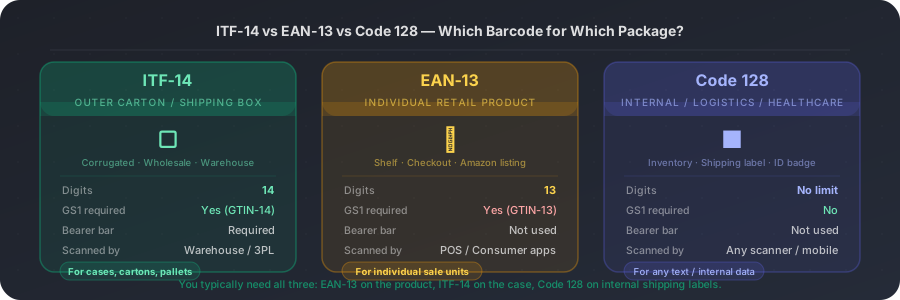
These three barcodes are not alternatives to each other — they operate at different levels of the supply chain. Understanding which goes where prevents costly relabelling and scan failures at warehouse intake.
ITF-14 goes on the outer shipping carton or master case. EAN-13 goes on the individual retail unit. Code 128 goes on internal documents, shipping labels, pick tickets, and any data that doesn't need GS1 registration.
A fully compliant retail product typically carries all three: an EAN-13 on the item, an ITF-14 on the case, and a Code 128 on the address label or delivery note.
Do not use random 14-digit numbers
GS1 registration is required
ITF-14 barcodes must be derived from a genuine GS1-registered GTIN. Inventing a random 14-digit number and encoding it as an ITF-14 will produce a barcode that scans — but the GTIN it encodes will not validate against any global product database. Major retailers and Amazon verify GTINs against GS1's database before accepting product listings. A carton barcode built on a fake GTIN will cause the entire shipment to be rejected at warehouse intake.
ITF-14 barcode size and print requirements
GS1 specifies minimum and recommended sizes for ITF-14 barcodes on corrugated packaging. In practical terms, the barcode should be at least 32mm tall (excluding the bearer bar) and 108mm wide.
Larger is better when printing on corrugated cardboard. Cardboard surfaces introduce more scan variability than flat labels, and a bigger barcode gives the scanner more signal to work with.
Always print ITF-14 barcodes in black on a white or light background. Avoid printing directly on natural kraft brown cardboard — the contrast is insufficient for reliable scanning. Use a white label or print on a white-coated area of the carton.
Resolution matters. For inkjet or thermal printing, use at least 300 DPI. For flexographic printing on carton surfaces, work with your print vendor to confirm their minimum bar width tolerance.
When you don't need an ITF-14
Not every product needs a carton barcode
If you sell directly to consumers through your own website, through marketplaces where you ship individual units (rather than bulk cases to a warehouse), or through channels that don't use automated scanning at a case level, you may only ever need EAN-13. ITF-14 becomes necessary when you supply to major retailers, use a 3PL, sell to Amazon FBA in case packs, or operate a distribution system that moves goods in bulk packaging.
Generate your ITF-14 barcode free on LinkLab
Free ITF-14 barcode generator — no account required
Enter your GTIN-13, choose your Packaging Indicator, and download an SVG or PNG with bearer bar — ready for carton printing or digital submission.